If you have shopped for network cables, you have probably run into a tangle of terms: RJ45, Ethernet, Cat6, RJ11. They are used loosely and often interchangeably — but they are not the same thing. This guide clears up the confusion, answering what RJ45 stands for, whether RJ45 is the same as an Ethernet cable, how RJ45 differs from Cat6, and whether Ethernet uses RJ11 or RJ45.
What Does RJ45 Stand For?
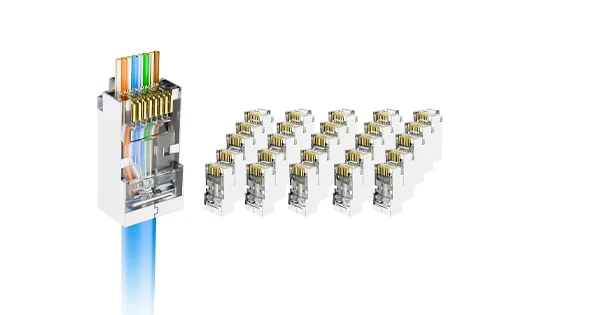
RJ45 stands for Registered Jack 45. “Registered Jack” comes from a US telecommunications standard for connectors and wiring, and 45 is the interface number. In everyday networking, RJ45 refers to the 8P8C connector — meaning 8 Positions and 8 Contacts — the rectangular 8-pin plug and jack used to terminate Ethernet cables. Of its eight pins, the connector provides contact for the four twisted pairs inside a network cable, following a standardized pinout (T568A or T568B) so devices interoperate globally.
The key point: RJ45 is a connector, not a cable.
Is RJ45 the Same as an Ethernet Cable?
No — and this is the most common mix-up. RJ45 is the connector; the Ethernet cable is the cable. An Ethernet cable is the medium that carries the data — twisted-pair copper wiring classified by category (Cat5e, Cat6, Cat6a, and so on). RJ45 is the 8-pin plug attached to the ends of that cable. When people say “RJ45 cable,” they almost always mean an Ethernet cable fitted with RJ45 connectors.
They work together but describe different things: the cable defines the performance (bandwidth, speed, distance), while the RJ45 connector defines the physical interface that plugs into a jack. In fact, not every Ethernet cable ends in RJ45 — fiber Ethernet, for example, uses optical connectors instead.
Are RJ45 and Cat6 the Same?
No. This is the same connector-versus-cable distinction in different words. Cat6 is a type of Ethernet cable; RJ45 is the connector on its ends. “Cat6” is short for Category 6, a performance standard defining how the copper pairs are built and tested — higher bandwidth (typically up to 250 MHz versus 100 MHz for Cat5e) and support for higher speeds. RJ45 is the standardized plug that terminates Cat5e, Cat6, Cat6a, and similar cables.
Think of it this way: Cat6 is the cable, RJ45 is the plug on the end. One useful caution — the RJ45 connectors and jacks should be rated for the cable’s category. Terminating a Cat6 cable with a connector meant for Cat5e can drag the whole link down to the lower performance, because a channel is only as good as its weakest component.
Is Ethernet RJ11 or RJ45?
Ethernet uses RJ45, not RJ11. The two connectors look similar but are different sizes and serve different purposes:
- RJ45 — an 8-pin (8P8C) connector for digital Ethernet data. Larger and rectangular. Used with Cat5e, Cat6, and similar cables for computers, routers, switches, and networking.
- RJ11 — a smaller connector (typically 6-position, with fewer contacts) for analog telephone lines and fax machines. Narrower and shorter.
A smaller RJ11 plug can physically fit into an RJ45 socket, but the reverse cannot happen, and RJ11 is entirely unsuited to Ethernet speeds. So if it is Ethernet, it is RJ45.
Connector vs Cable: The Whole Picture
| Term | What It Is | Role |
| RJ45 | 8-pin (8P8C) connector | The plug/jack on the ends of a network cable |
| Ethernet cable | Twisted-pair cabling (a medium) | Carries the data; performance set by category |
| Cat6 | A category of Ethernet cable | Defines bandwidth/speed of the cable itself |
| RJ11 | Smaller telephone connector | Analog phone/fax lines — not Ethernet |
How They All Fit Together in a Link
Seeing how these pieces combine makes the terminology click. A complete copper Ethernet link is built from a cable of a certain category — say Cat6 — with an RJ45 connector crimped or punched onto each end, plugging into RJ45 jacks on your devices, all carrying the Ethernet protocol that defines how the data is framed and transmitted. The category sets the ceiling for bandwidth and speed; the RJ45 connector provides the standardized eight-contact interface; the Ethernet protocol governs the communication. Change the cable category and you change the performance; change the connector and you change nothing about the cable but everything about whether it physically plugs in. This layered view — medium, connector, protocol — is why professionals are careful to name each part precisely rather than lumping them all under “RJ45 cable.”
Why These Distinctions Matter
Getting the terminology right prevents real mistakes. If you order “RJ45 cables” when you actually need a specific category for a required speed, you can end up with a link that bottlenecks your network. If you assume RJ45 and Cat6 are interchangeable, you might pair a high-performance cable with an under-rated connector and lose the performance you paid for. And confusing RJ11 with RJ45 leads to connectors that physically will not serve the purpose. Understanding that RJ45 is the connector, the Ethernet cable is the medium, and the category (like Cat6) sets the performance lets you specify exactly what a network needs.
Choosing the Right Cable and Connector Together
Because performance depends on the whole channel, the cable and connector should be specified together. If a network needs 10 Gigabit over a run, choosing a Cat6a cable is only effective if the RJ45 connectors and jacks are rated to match; pairing that cable with connectors built for a lower category pulls the achievable performance down to the weaker component. The same logic applies to shielding: a shielded cable intended for an electrically noisy environment needs shielded RJ45 connectors that bond to the cable’s shield, or the interference protection is lost at the ends. So when you plan a link, decide the required speed and environment first, then select a cable category and matching connectors as a set. Treating them as one system — rather than assuming any RJ45 will do on any cable — is what actually delivers the performance the category promises.
A Note on “Ethernet Port”
You will also hear “Ethernet port,” which adds one more layer. An Ethernet port is the device’s networking socket; on copper networks, that socket is almost always an RJ45 jack. But Ethernet can also run over fiber using entirely different connectors, so “Ethernet port” describes the function while “RJ45” describes the specific copper connector most of them use.
Get the Right Connectors and Tools
Whether you are terminating Cat6 with RJ45 or building a mixed copper-and-fiber network, the right tools make it reliable. Aevumix supplies RJ45 connectors, crimping and termination tools, and network cable testers, alongside a full range of fiber optic tools and test equipment. If you would like help choosing the right connectors and tools for your cabling, contact our team.
FAQs
What Does RJ45 Stand For?
RJ45 stands for Registered Jack 45. In networking it refers to the 8P8C (8-position, 8-contact) connector — the rectangular 8-pin plug and jack used to terminate Ethernet cables.
Is RJ45 the Same as an Ethernet Cable?
No. RJ45 is the connector on the ends of the cable; the Ethernet cable is the twisted-pair medium that carries the data. “RJ45 cable” usually means an Ethernet cable fitted with RJ45 connectors.
Are RJ45 and Cat6 the Same Thing?
No. Cat6 is a category of Ethernet cable that defines performance; RJ45 is the connector on its ends. For best results, the RJ45 connectors should be rated for the cable’s category.
Does Ethernet Use RJ11 or RJ45?
Ethernet uses RJ45, the 8-pin connector. RJ11 is a smaller connector for analog telephone lines and fax machines and cannot support Ethernet, even though the two look similar.
Can I Plug an RJ11 Cable Into an RJ45 Port?
A smaller RJ11 plug can physically fit into an RJ45 socket, but it will not function as an Ethernet connection and is not designed for it. The reverse — an RJ45 plug into an RJ11 socket — does not fit.