The one-click fiber cleaner is the workhorse of connector maintenance. Push it, hear the click, and a fresh strip of cleaning tape wipes the end face — fast, dry, and repeatable. But the tool only performs if your technique is right. This guide explains how to use a one-click fiber cleaner correctly, for connectors seated in adapters and on exposed patch cords alike.
What a One-Click Cleaner Is
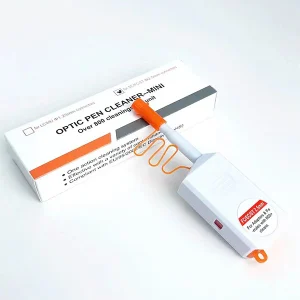
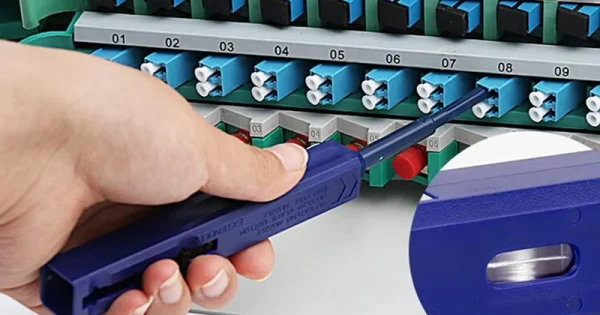
A one-click (push-type) cleaner is a self-contained tool holding lint-free cleaning tape in an anti-static body. A single push advances a clean section of tape across the connector ferrule, removing dust, particulate, and light oils. These cleaners are alcohol-free, reach recessed connectors inside adapters, and typically deliver several hundred cleanings per unit.
They matter because the single-mode fiber core is only about 9 microns wide. A contaminant there causes insertion loss and back reflection, so a quick, consistent cleaning tool prevents a lot of trouble.
Match the Cleaner to the Connector
- 2.5 mm cleaners — for SC, FC, and ST connectors.
- 1.25 mm cleaners — for LC and MU connectors.
- MPO/MTP cleaners — dedicated tools that clean all fibers in a multi-fiber array in one push.
Always Inspect First
Use the inspect–clean–inspect method. Inspect the end face with a fiber scope or digital probe, clean with the one-click cleaner only if contamination is present, and re-inspect before mating. Cleaning a connector that is already clean can add static and attract new dust, so inspection tells you whether cleaning is needed and confirms it worked.
How to Use a One-Click Cleaner: Step by Step
For Connectors Inside an Adapter or Bulkhead
1. Remove the cleaner’s protective cap.
2. Insert the cleaner tip straight into the adapter or bulkhead — keep it square, not angled.
3. Push the body forward with light, even pressure until you hear the audible “click,” which means a fresh strip of tape has swept the ferrule.
4. Withdraw the tool; one push is usually enough.
5. Re-inspect, then mate or recap.
For Exposed Patch-Cord Connectors
1. Remove the cap and any guide cap.
2. Insert the connector ferrule into the cleaner’s guide opening.
3. Push until you hear the “click.”
4. Withdraw and re-inspect before mating.
Technique that matters: insert and push straight, use light pressure, do not twist or force it, and never touch the cleaning tip with your fingers. Twisting or angling the tool can scratch the end face.
Why One-Click Cleaners Are So Widely Used
One-click cleaners have become a field standard because they solve several problems at once. They are self-contained, with no separate solvent bottle or loose parts to lose, so they deploy anywhere. Each push advances a fresh strip of tape, which prevents the reintroduction of contamination that plagues reused swabs. Their anti-static, alcohol-free design avoids leaving the static charge a plain dry wipe creates. Above all, they reach recessed connectors inside adapters, bulkheads, and transceiver ports — places a flat wipe cannot touch. For quick, repeatable pre-mate cleaning, they are hard to beat.
Understanding the Contamination You’re Removing
A one-click cleaner is a dry tool, so it works best on the contamination that dry methods lift: airborne dust and lint, which are easily attracted to the end face by static electricity. These particles may sit outside the core but migrate into the critical light-carrying zone when connectors are mated, causing loss and reflection. Oily films from fingerprints or residues are a different problem — they change the refractive index at the interface and generally will not lift with a dry pass. Recognizing which type you are dealing with tells you whether the one-click cleaner will finish the job or whether you need to move to wet-to-dry.
When to Use Something Else
A one-click cleaner uses a dry method, ideal for dust and light contamination. For stubborn oils, fingerprints, or dried residue it may not be enough. In those cases switch to the wet-to-dry method with a cassette cleaner or lint-free wipe: a small drop of fiber-grade fluid, a straight pull from wet to dry, finishing dry. Keeping both a one-click cleaner and a cassette cleaner in your kit covers nearly every situation.
Use a One-Click Cleaner With Inspection
The one-click cleaner does the cleaning, but a fiber inspection scope or digital probe does the verifying — and you need both. The single-mode core is only about 9 microns across, far too small to assess by eye, so inspecting before cleaning confirms whether cleaning is needed and inspecting afterward confirms the end face is genuinely ready to mate. Probes with automated pass/fail analysis take the judgment out of it. Using a one-click cleaner without inspection means cleaning blindly and hoping, which undercuts the whole point of a precise, repeatable tool. Keep the two together in your kit.
Troubleshooting a One-Click Cleaner
When a connector keeps failing inspection after a one-click cleaning, run through the common causes rather than reaching for a second tool at random. Check the tip size first — a 2.5 mm cleaner cannot properly service a 1.25 mm LC ferrule, and using the wrong size leaves contamination behind. Next, identify the contamination type: dry one-click cleaning lifts dust and lint well but often cannot remove oily films or fingerprints, which call for the wet-to-dry method. Confirm the tool still has cleanings left, because a depleted cleaner smears rather than removes. Make sure each pass was straight and produced a clean click; an angled or incomplete push cleans only part of the end face. And if a defect persists after correct cleaning, inspect closely — a permanent scratch or pit in the core zone is physical damage, not debris, and no amount of cleaning will remove it.
Caring for and Storing One-Click Cleaners
Because a one-click cleaner carries its own cleaning tape, keeping that tape uncontaminated is key to consistent results. Replace the protective cap whenever the tool is idle so dust cannot settle on the tip. Store cleaners in a closed case rather than loose in a toolbag, and keep unused tools sealed until needed. Do not touch the exposed cleaning surface, and retire the tool once it reaches its rated number of cleanings — pushing a depleted cleaner past its life smears contamination instead of removing it. A well-kept cleaner delivers a genuinely fresh cleaning surface on every push.
One-Click Cleaner: Quick Reference
| Use Case | Recommended Action |
| Connector inside adapter or port | Insert straight, push to “click,” one pass |
| Exposed patch-cord ferrule | Insert ferrule into guide, push to “click” |
| LC connector (1.25 mm) | Use a 1.25 mm one-click cleaner |
| SC / FC / ST connector (2.5 mm) | Use a 2.5 mm one-click cleaner |
| Heavy oil or residue | Switch to wet-to-dry with cassette or wipe |
Common Mistakes to Avoid
- Twisting or angling the cleaner: insert and push straight to avoid scratching the ferrule.
- Forcing it: use light pressure; hard or repeated pushing does not clean better.
- Skipping inspection: you never confirm the connector needed cleaning or that it is now clean.
- Using a dry cleaner on heavy oils: switch to wet-to-dry for stubborn contamination.
- Touching the cleaning tip: skin oil transfers straight onto the end face.
Get the Right One-Click Cleaners
A correctly sized one-click cleaner makes connector maintenance quick and reliable. Aevumix manufactures one-click fiber cleaners for SC, LC, FC, ST, and MPO/MTP connectors, plus cassette cleaners, cleaning pens, swabs, wipes, and inspection scopes. If you would like help choosing the right cleaners for your connectors and network, contact our team.
FAQs
How Does a One-Click Fiber Cleaner Work?
It holds lint-free cleaning tape in an anti-static body. A single push advances a fresh strip of tape across the connector’s ferrule end face, removing dust and light contamination in one motion, with no solvent needed.
What Does the Click Sound Indicate?
The click confirms the tool has engaged the end face and swept a fresh section of tape across it, completing one cleaning cycle. It signals that the pass is finished.
Can I Use One-Click Cleaners on Connectors Inside a Port?
Yes — that is one of their main strengths. They reach recessed connectors inside adapters, bulkheads, and transceiver ports. Insert the tip straight and push until the click, using the correct ferrule size.
How Long Does a One-Click Cleaner Last?
Most are rated for several hundred cleanings. Each push uses fresh tape so you never reuse a dirty surface. Replace the tool once its rated cleanings are used up.
Will a One-Click Cleaner Remove Fingerprints?
A dry one-click cleaner handles dust and light contamination well but may not fully remove oils or fingerprints. For those, use the wet-to-dry method with a fiber-grade fluid on a cassette cleaner or lint-free wipe.