A fiber optic cleaner pen — often called a one-click or push-type cleaner — is one of the most convenient tools in a technician’s kit. It cleans connector end faces quickly, without solvents, in a single push. But using it correctly matters just as much as owning it. This guide explains how to use a fiber optic cleaner pen properly, for connectors both in adapters and on exposed patch cords.
What a Fiber Optic Cleaner Pen Does
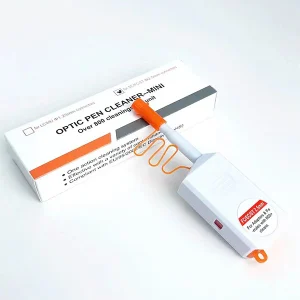
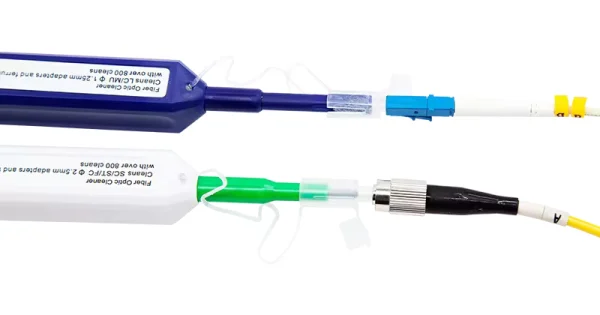
A cleaner pen holds a length of lint-free cleaning tape inside an anti-static resin body. When you push the pen, a fresh section of tape sweeps across the connector’s ferrule end face, lifting away dust, oils, and particulate in one motion. Most pens are alcohol-free, anti-static, and rated for several hundred cleanings — commonly 500 to 800 — before the tape is depleted and the pen is replaced.
Why does this matter? The single-mode fiber core is only about 9 microns across. A contaminant on that core blocks light and causes loss and reflection, so a fast, repeatable cleaning tool is invaluable.
Choose the Right Pen for Your Connector
Cleaner pens are sized to specific ferrules. Using the wrong size will not clean effectively:
- 2.5 mm pens — for SC, FC, and ST connectors.
- 1.25 mm pens — for LC and MU connectors.
- MPO/MTP pens — dedicated cleaners that clean all fibers in a multi-fiber array at once.
Before You Start: Inspect First
Follow the inspect–clean–inspect method. Inspect the end face with a fiber scope or digital probe first. Clean with the pen only if contamination is present, and re-inspect afterward. Cleaning an already-clean connector can generate static and attract new dust, so inspection tells you whether the pen is needed at all.
How to Use a Fiber Optic Cleaner Pen: Step by Step
For Connectors Inside an Adapter or Port (Bulkhead)
1. Remove the pen’s protective cap.
2. Insert the pen tip straight into the adapter or bulkhead — keep it square, never at an angle.
3. Push the pen body forward with light, even pressure until you hear an audible “click.” That click confirms a fresh strip of tape has swept the ferrule.
4. Withdraw the pen. One controlled push is normally enough.
5. Re-inspect and mate, or replace the dust cap.
For Exposed Patch-Cord Connectors
1. Remove the pen cap and the guide cap if present.
2. Insert the connector ferrule into the pen’s guide.
3. Push until you hear the “click.”
4. Withdraw and re-inspect before mating.
Key technique points: keep the pen square to the connector, use light pressure, never force it, do not twist, and never touch the cleaning tip with your fingers.
Why Technicians Rely on Cleaner Pens
Cleaner pens are popular for good reasons. They are self-contained — no separate bottle of solvent, no loose pieces to misplace — so they can be deployed anywhere in the field. Each push advances fresh cleaning material, which prevents reintroducing contamination the way a reused swab would. They are alcohol-free and anti-static, reducing the static charge that a plain dry wipe leaves behind. And they reach connectors seated inside adapters and bulkheads that a flat wipe simply cannot access. For routine, repeatable cleaning before mating, a pen is often the fastest reliable option.
Which Connectors Can a Pen Clean?
A correctly sized pen handles the vast majority of connector types encountered in the field:
- SC (2.5 mm): square push-pull connector common in telecom and enterprise links.
- LC (1.25 mm): compact connector used heavily in high-density data centers.
- FC and ST (2.5 mm): threaded and bayonet connectors in legacy, industrial, and test environments.
- MPO/MTP: multi-fiber arrays that need a dedicated pen to clean every fiber at once.
Pens clean both the exposed ferrule of a patch cord and the connector seated inside an adapter, which is what makes them so versatile.
When a Pen Isn’t Enough
A cleaner pen excels at dust and light contamination, but it uses a dry method. For stubborn oils, fingerprints, or dried residue, switch to the wet-to-dry method with a cassette cleaner or lint-free wipe: a small drop of fiber-grade fluid, a straight pull from wet to dry, then finish dry. Many technicians carry both a pen and a cassette cleaner for exactly this reason.
Pair Your Pen With Inspection
A cleaner pen is only half of a good cleaning routine — the other half is a fiber inspection scope or digital probe. You cannot judge a 9-micron core by eye, so inspecting before cleaning tells you whether the pen is needed, and inspecting after tells you whether it worked. Digital probes with automated pass/fail analysis remove the subjectivity entirely. Skipping inspection means you are cleaning blindly and mating without confirmation, which defeats the purpose of a precise tool. Keep a scope beside your pen and use them together on every connection.
Troubleshooting: Still Seeing Contamination After Using the Pen
If a connector still fails inspection after a pen cleaning, work through the likely causes before assuming the pen is faulty. First, confirm you are using the right tip size for the ferrule; a 2.5 mm pen will not properly clean a 1.25 mm LC end face and vice versa. Second, check whether the contamination is an oily film rather than dust — a dry pen struggles with fingerprints and residues, which need the wet-to-dry method. Third, make sure the pen has not reached the end of its rated cleanings; a depleted tape smears instead of lifting. Fourth, verify you inserted straight and heard a clean click; an angled or half-completed push may only partially clean the end face. Finally, if inspection still shows a mark after proper cleaning, it may be a permanent scratch or pit in the glass rather than removable debris — in which case the connector or cable needs attention, not more cleaning.
Caring for and Storing Your Cleaner Pen
A cleaner pen only works if the tape inside stays clean, so a little care extends its useful life. Keep the protective cap on when the pen is not in use to stop dust reaching the cleaning tip. Store it in a closed case rather than loose in a bag, and open only the tools you need for the current job so the rest stay sealed. Never touch the exposed cleaning tip with your fingers, and do not try to force more cleanings out of a pen that has reached its rated life — a depleted pen smears rather than cleans. Treating the pen as the precision instrument it is keeps every push effective.
Cleaner Pen Do’s and Don’ts
| Do | Don’t |
| Insert straight and push until the “click” | Twist or angle the pen against the ferrule |
| Match the pen size to the ferrule (2.5 / 1.25 mm) | Force the pen or push repeatedly and hard |
| Inspect before and after cleaning | Touch the cleaning tip with your fingers |
| Replace the pen when its cleanings are used up | Rely on a dry pen for heavy oil contamination |
Get the Right Cleaner Pens
A quality, correctly sized cleaner pen makes fast, repeatable cleaning effortless. Aevumix manufactures fiber optic cleaner pens for SC, LC, FC, ST, and MPO/MTP connectors, alongside cassette cleaners, swabs, wipes, and inspection scopes. If you would like help choosing the right pens for your connectors, contact our team and we will point you to the right products.
FAQs
How Does a Fiber Optic Cleaner Pen Work?
A cleaner pen holds lint-free cleaning tape inside an anti-static body. Pushing the pen advances a fresh strip of tape across the ferrule end face, removing dust and light contamination in a single motion — no solvent required.
What Does the “Click” Mean?
The audible click tells you the pen has engaged the end face and a fresh section of cleaning tape has swept across it, completing one cleaning cycle. It is your signal that the pass is done.
How Many Times Can I Use a Cleaner Pen?
Most pens are rated for several hundred cleanings, commonly 500 to 800. Each push uses a fresh strip of tape, so you never reuse a dirty surface. Replace the pen once its rated cleanings are used up.
Can a Cleaner Pen Remove Oil and Fingerprints?
A dry cleaner pen handles dust and light contamination well but may not fully remove oils or dried residue. For those, use the wet-to-dry method with a fiber-grade fluid on a cassette cleaner or lint-free wipe.
Do I Need a Different Pen for LC and SC Connectors?
Yes. LC connectors use a 1.25 mm ferrule and SC, FC, and ST use 2.5 mm. Use a pen sized for the ferrule you are cleaning; MPO/MTP connectors need a dedicated multi-fiber cleaner.